Authenticate your sending domain (SPF, DKIM & DMARC)
Your sending domain is the domain in your From address — for example acme.com in newsletter@acme.com, or a subdomain like mg.acme.com. Authenticating it tells inboxes that RadarSend (through your sending service) is allowed to send for you, which is the single biggest factor in whether your email reaches the inbox.
Authentication has three parts, and it’s important to know where each one lives:
- SPF and DKIM are configured at your sending service (Amazon SES, SendGrid, etc.) — not in RadarSend.
- DMARC is a record you publish in your own DNS. RadarSend verifies it for you (it never changes your DNS).
Before you begin#
- A sending service connected in RadarSend.
- Access to your domain’s DNS settings.
How sending domains show up in RadarSend#
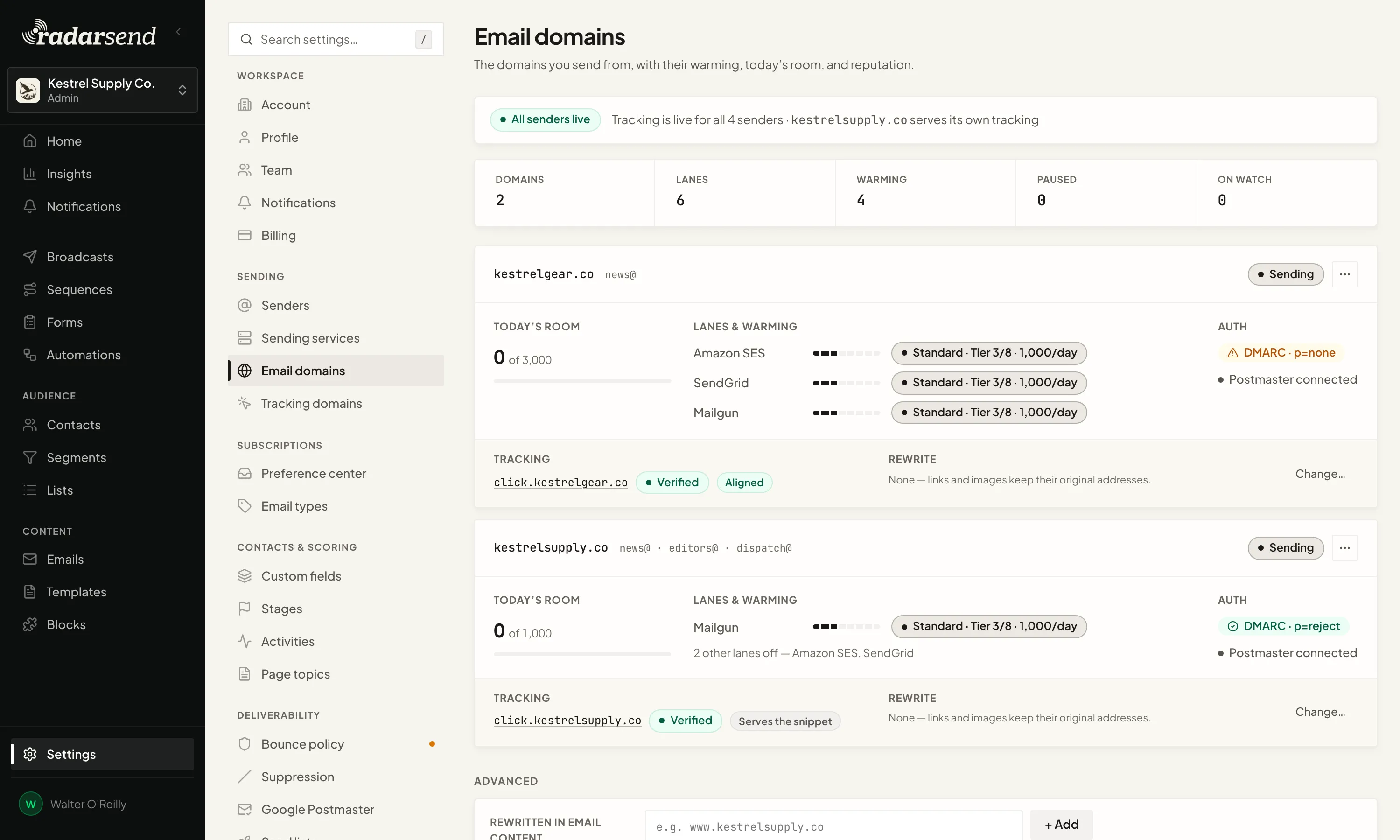
You don’t add sending domains manually. A sending domain appears automatically the first time you add a sender on that domain. To see them, go to Settings→Sending→Email domains. Each domain has a Details page showing its authentication status, reputation, and warming.
Step 1 — Set up SPF and DKIM at your sending service#
SPF and DKIM live with the sending service that actually delivers your mail, so you authenticate your domain in that service’s dashboard. Each setup guide covers this:
- Amazon SES · SendGrid · Mailgun · Resend · Mailjet
RadarSend doesn’t add domains to your sending service or create its DNS records; you do that in the service’s dashboard. RadarSend reads the result: open the service under Settings→Sending→Sending services and the Verified sending domains section shows each domain’s status there (for Amazon SES, also DKIM and custom MAIL FROM), with a link to it in the service’s console. If a test send in the Add-sender wizard is rejected, the wizard shows the domain’s status and links to the right page.
Step 2 — Add a DMARC record#
DMARC ties SPF and DKIM together and tells inboxes what to do with mail that fails them. Add a TXT record in your DNS:
- Name/host:
_dmarc.yourdomain.com - Value: start with
v=DMARC1; p=quarantine; rua=mailto:you@yourdomain.com
We recommend at least p=quarantine. (You can start at p=none to monitor, then move to p=quarantine and eventually p=reject as you gain confidence — see Good to know.)
RadarSend checks this record for you. On the sending domain’s Details page, use Re-check DMARC to probe it. The status chip shows DMARC · p=reject / p=quarantine / p=none / missing / unchecked. RadarSend only reads this record — it never edits your DNS.
Step 3 — Finish setting up the domain#
The sending domain’s Details page has a Finish setting up this domain checklist:
- Identities added — at least one sender uses this domain.
- DMARC policy enforced — your DMARC record is published at
p=quarantineor stronger. - Connect Google Postmaster — connect Google Postmaster Tools to see Gmail’s spam rate and SPF, DKIM, and DMARC results for this domain.
- Choose a warming plan — pick how fast to ramp sending volume (see Deliverability & warmup).
Common issues#
- “Where do I add my SPF/DKIM records?” — At your sending service, not in RadarSend. RadarSend only verifies DMARC. See your sending service guide.
- My domain isn’t listed. Sending domains appear only after you add a sender on that domain.
- DMARC shows “missing.” The
_dmarc.yourdomain.comTXT record isn’t published (or hasn’t propagated). Add it and click Re-check DMARC; DNS changes can take a few hours. - DMARC shows “p=none.” That’s monitor-only and counts as not yet enforced — move to
p=quarantine.
Good to know#
- Ramp DMARC gradually:
p=none(monitor) →p=quarantine→p=reject. Jumping straight top=rejectbefore SPF/DKIM are solid can bounce legitimate mail. - Use a subdomain for marketing (e.g.
mg.acme.comornews.acme.com) so your bulk sending reputation stays separate from your primary domain’s transactional mail. - Warming is per domain × sending service. If you send the same domain through two sending services, each has its own independent warming track.