Send webhooks to other apps
An outbound webhook is an HTTP request RadarSend sends to another system when something happens to a contact. A contact crosses a score threshold, joins a list, or reaches a step in a sequence, and RadarSend posts that contact’s record to your CRM, a Slack channel, or your own code.
Webhooks go out from two places:
- An Automation with the Call a webhook action.
- A sequence Action step set to Call a webhook. See Sequence steps.
You don’t subscribe a URL to a list of events. Instead, you decide in the Automation or the sequence exactly when a contact should be sent, and pick where it goes.
Before you begin#
- You need to be an admin to add or change webhook destinations. Other team members see the delivery log only.
- An endpoint that accepts a JSON
POST(orPUTorPATCH) and replies with a2xxstatus within 5 seconds.
Save a destination#
A saved webhook holds the URL, the method, and any credentials in one place. Automations and sequences refer to it by name, so you can change a URL or rotate a key once and every rule that uses it picks up the change.
- Go to Settings→Developer→Webhooks.
- Click New webhook.
- Fill in the form:
- Name (required) — how the webhook appears in pickers, for example
Salesforce sync. Names must be unique in your workspace. - Description — an optional note for other admins.
- URL (required) — must start with
http://orhttps://. Usehttps://for anything carrying contact data. - Method — POST (the default), PUT, or PATCH.
- Authentication — None, HMAC signed, Bearer token, or Basic auth. For a bearer token, enter the token. For basic auth, enter
user:password. - HMAC signing secret (optional) — a secret you choose. When one is set, RadarSend signs every request so your endpoint can check it came from us. See Verify the signature.
- Custom headers — click Add header for any extra headers your endpoint needs, up to 25.
- Name (required) — how the webhook appears in pickers, for example
- Click Save.
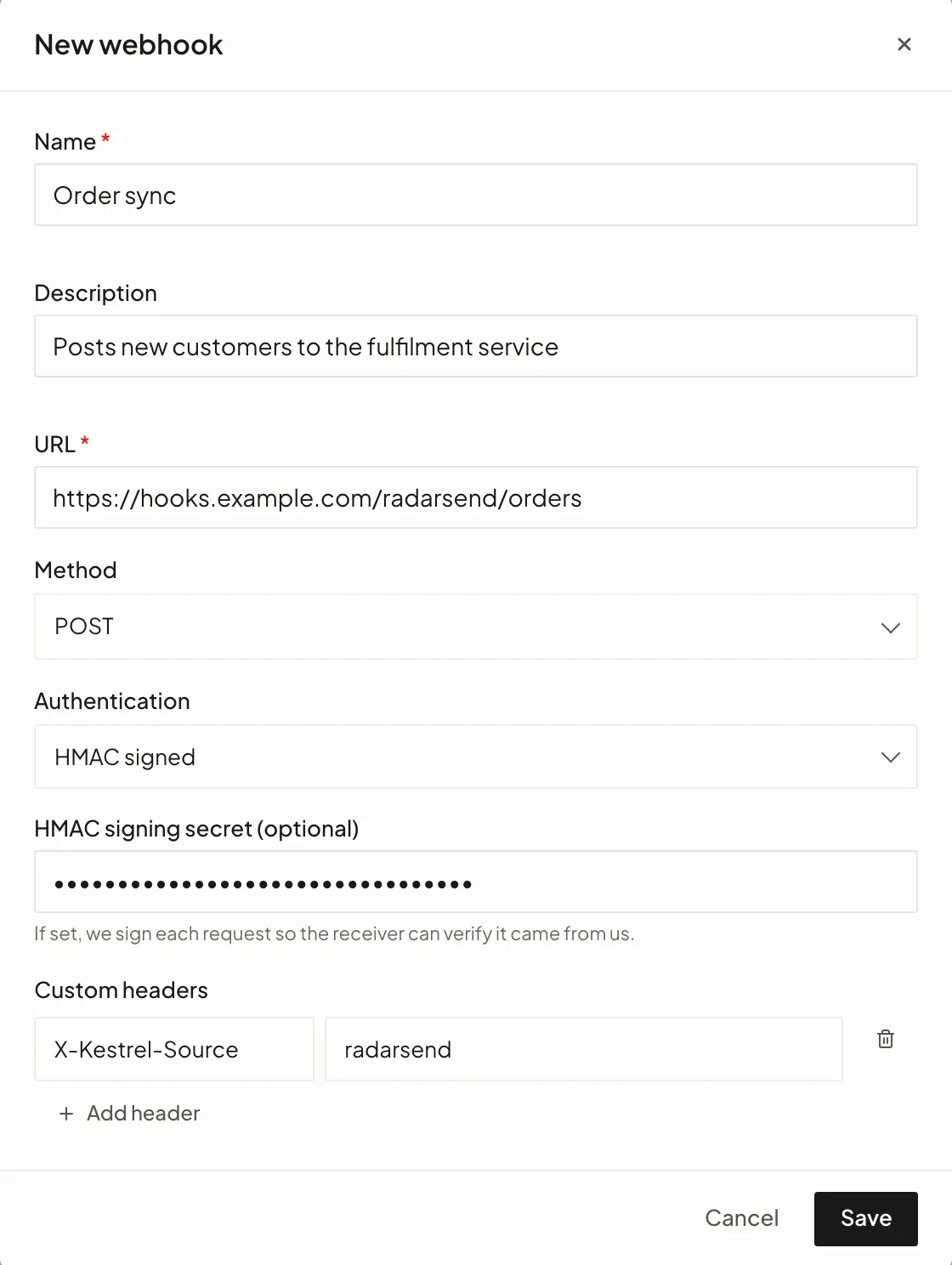
Credentials and secrets are stored encrypted and are never shown again after you save. To replace one, type a new value over Credential set — type to replace or Secret set — type to replace and save.
Send contacts to it#
In an Automation or a sequence Action step, choose Call a webhook. Then, under Destination:
- Pick a saved webhook from the Webhook list, or
- Click Use a one-off URL instead and enter a One-off URL, with an optional HMAC secret (optional). A one-off URL is always sent as a
POSTand can’t carry other authentication or headers, so a saved webhook is the better choice for anything you’ll use more than once.
Manage webhooks → takes you to the Settings page to add a new destination.
What RadarSend sends#
Each request has a JSON body with the same shape:
{
"id": "5b0c8f7e-2a41-4d8e-9c3a-6f1e2d7b9a10",
"spec_version": "1",
"type": "contact.score_threshold_crossed",
"occurred_at": "2026-09-28T14:02:11.482Z",
"tenant_id": "…",
"source": {
"kind": "automation",
"id": "…",
"name": "High-value customer → notify Slack",
"node_id": null,
"enrollment_id": null,
"trigger_type": "score_threshold",
"trigger_config": { "score_track": "customer", "direction": "above", "threshold": 70 },
"event_id": "…",
"execution_id": "…"
},
"data": {
"contact": {
"id": "…",
"external_id": "crm-4411",
"email": "dana@example.com",
"first_name": "Dana",
"last_name": "Reyes",
"company": "Example Co",
"title": "Head of Ops",
"phone": null,
"stage_id": "…",
"stage_slug": "customer",
"tags": ["repair-customer"],
"custom_fields": { "loyalty_tier": "Gold" },
"prospect_score": 12,
"customer_score": 74,
"global_status": "active",
"created_at": "2026-03-02T09:15:00.000Z"
}
}
}
idis unique to this event and stays the same if the request is retried. Use it to ignore duplicates.sourcesays what sent it. For an Automation,kindisautomationandidandnameare the Automation’s;trigger_typeandtrigger_configdescribe its trigger. For a sequence,kindissequence,idandnameare the sequence’s, andnode_idandenrollment_ididentify the step and the contact’s enrollment.data.contactis the contact’s record at the moment the request was built, including every custom field by its field key.
Event types#
The type field tells you why the contact was sent:
type | Sent when |
|---|---|
contact.score_threshold_crossed | An Automation with the Score crosses threshold trigger fires. |
contact.activity_recorded | An Automation with the Activity occurs trigger fires. |
contact.segment_entered | An Automation with the Added to a list or Enters a segment trigger fires. |
contact.segment_exited | An Automation with the Removed from a list or Exits a segment trigger fires. |
contact.attribute_changed | An Automation with the Contact field changes trigger fires. |
contact.form_submitted | An Automation with the Submits a form trigger fires. |
sequence.node_reached | A contact reaches a Call a webhook step in a sequence. |
Headers#
| Header | Value |
|---|---|
Content-Type | application/json |
X-Webhook-Event-Id | The body’s id |
X-Webhook-Event-Type | The body’s type |
X-Webhook-Source-Id | The Automation or sequence ID |
X-Webhook-Timestamp | When the request was signed, in Unix seconds. Only sent with a signing secret. |
X-Webhook-Signature | The HMAC signature. Only sent with a signing secret. |
Authorization | Bearer … or Basic …, when the webhook uses that authentication |
Your custom headers are sent too, but they can’t replace any of these.
Verify the signature#
When a webhook has a signing secret, RadarSend computes an HMAC-SHA256 of the timestamp, a period, and the raw request body, using your secret as the key, and sends it as a lowercase hex string in X-Webhook-Signature. There’s no prefix such as sha256=.
To check it on your side:
- Read
X-Webhook-TimestampandX-Webhook-Signature. - Reject the request if the timestamp is too old. Pick a window that suits you, such as 5 minutes. This stops someone replaying a captured request later.
- Compute
HMAC-SHA256(secret, timestamp + "." + rawBody)as hex. - Compare it with the signature using a constant-time comparison.
Use the raw body bytes, not a re-serialized copy of the parsed JSON. Re-serializing can change spacing or key order and break the match.
In Node.js with Express:
import crypto from 'node:crypto';
import express from 'express';
const app = express();
app.post('/webhooks/radarsend', express.raw({ type: 'application/json' }), (req, res) => {
const timestamp = req.get('X-Webhook-Timestamp');
const signature = req.get('X-Webhook-Signature');
if (!timestamp || !signature) return res.sendStatus(400);
const age = Math.abs(Math.floor(Date.now() / 1000) - Number(timestamp));
if (!Number.isFinite(age) || age > 300) return res.sendStatus(400);
const expected = crypto
.createHmac('sha256', process.env.RADARSEND_WEBHOOK_SECRET)
.update(`${timestamp}.`)
.update(req.body)
.digest('hex');
const a = Buffer.from(signature, 'hex');
const b = Buffer.from(expected, 'hex');
if (a.length !== b.length || !crypto.timingSafeEqual(a, b)) return res.sendStatus(401);
const event = JSON.parse(req.body.toString('utf8'));
// Skip event.id if you've already processed it, then reply quickly.
res.sendStatus(200);
});
Each retry is signed again with a new timestamp, so a retried request passes the age check.
Deliveries and retries#
RadarSend waits up to 5 seconds for a reply. Any 2xx status counts as delivered.
If a request fails, RadarSend tries again, up to 3 attempts in all, about 5 and then 10 seconds apart:
- Retried: timeouts, network errors,
5xxresponses,429 Too Many Requests(RadarSend waits as long as yourRetry-Afterheader asks, up to 15 minutes), and redirects. - Not retried: any other
4xx. RadarSend takes it to mean the request itself was wrong, so sending it again wouldn’t help.
Redirects aren’t followed, so point the webhook at the final URL. Requests to private and internal network addresses, such as localhost or 10.x.x.x, are blocked.
If 10 deliveries in a row fail to the same URL, RadarSend pauses deliveries to it. New requests are held and retried every 5 minutes for up to 24 hours, and the first one that succeeds resumes normal delivery. Anything still undelivered after 24 hours is dropped, so fix the endpoint before then.
The delivery log#
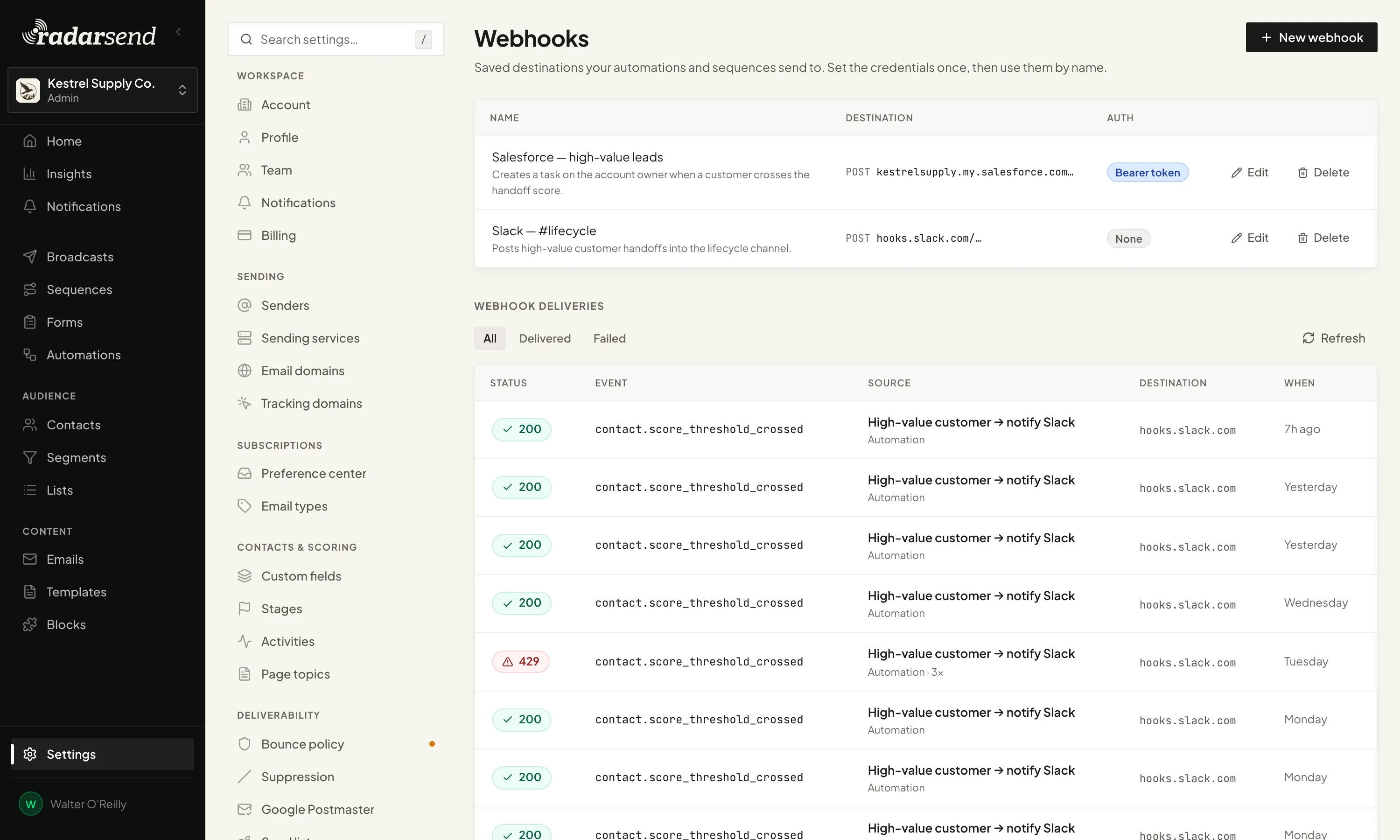
The Webhook deliveries log sits below your saved webhooks in Settings→Developer→Webhooks, and below the list on the Automations page. It shows the 50 most recent deliveries, newest first. Use the All, Delivered, and Failed tabs to filter, and Refresh to update.
| Column | What it shows |
|---|---|
| Status | The HTTP status your endpoint returned, or Failed if it never replied |
| Event | The event type |
| Source | The Automation or sequence that sent it, with · 3× when it took more than one attempt |
| Destination | The host it went to. The path is hidden because it often contains a secret. |
| When | When it was sent |
Click a row to see the details: the contact (View contact →), how many attempts it took, the error if it failed, and the Event ID your endpoint received in X-Webhook-Event-Id.
If deliveries to a URL are paused, a Deliveries paused notice at the top of the log names the host, the last error, and when RadarSend will try again.
Common issues#
- Status 401 or 403. Your endpoint rejected the credentials. Check the Authentication setting and re-enter the token or password. RadarSend doesn’t retry these.
- “Failed” with a network error. RadarSend couldn’t reach the URL, or it took longer than 5 seconds to reply. Reply with
2xxfirst and do slow work afterwards. - A 3xx status. Your endpoint redirected, for example from
http://tohttps://or to a trailing slash. Save the final URL instead. - Signature doesn’t match. Make sure you’re hashing the raw body with the timestamp and a period in front, and that the secret is the one saved on this webhook. A one-off URL uses its own HMAC secret, not a saved webhook’s.
- The same event arrived twice. A retry can follow a request your endpoint processed but didn’t answer in time. Skip events whose
idyou’ve already seen. - Deliveries stopped after a webhook was deleted. Automations and sequence steps that pointed at it fail until you choose another destination. The log shows these as failed deliveries.
- Name already exists. Webhook names must be unique in a workspace. Pick another name.
- “Header is reserved.” The headers RadarSend sets itself can’t be added as custom headers. To send an
Authorizationheader, set Authentication instead.
Good to know#
- Deliveries can arrive out of order. Several go out at once, and retries arrive later, so use
occurred_atif order matters. - The log keeps 30 days. It records the final outcome of each delivery, not every attempt, and doesn’t store request or response bodies.
- There’s no redeliver button. If an endpoint was down, fix it and let the next event through. To resend a contact, trigger the Automation or step again.
- Rotating a secret takes effect right away. There’s no overlap where both secrets work, so update your endpoint and the webhook together.
- These aren’t sending-service webhooks. Amazon SES, SendGrid, and the other sending services post bounces and complaints back to RadarSend through a URL RadarSend sets up for you when you connect them. This guide is about the requests RadarSend sends out.