Tracking on your own website

Your website sets its own cookies

Requires Cloudflare

Typically, cookies that track page visits get tied back to a subdomain, which can look suspicious to browsers. Some browsers, including Safari, will limit that cookie to 7 days.

If your domain uses Cloudflare, RadarSend is built to have that cookie set by your own site, not a separate tracking subdomain. That can allow the cookie to last up to a year, so people who come back weeks after an email can still be recognized.

You can send from a second domain and keep everything matched

Requires Cloudflare

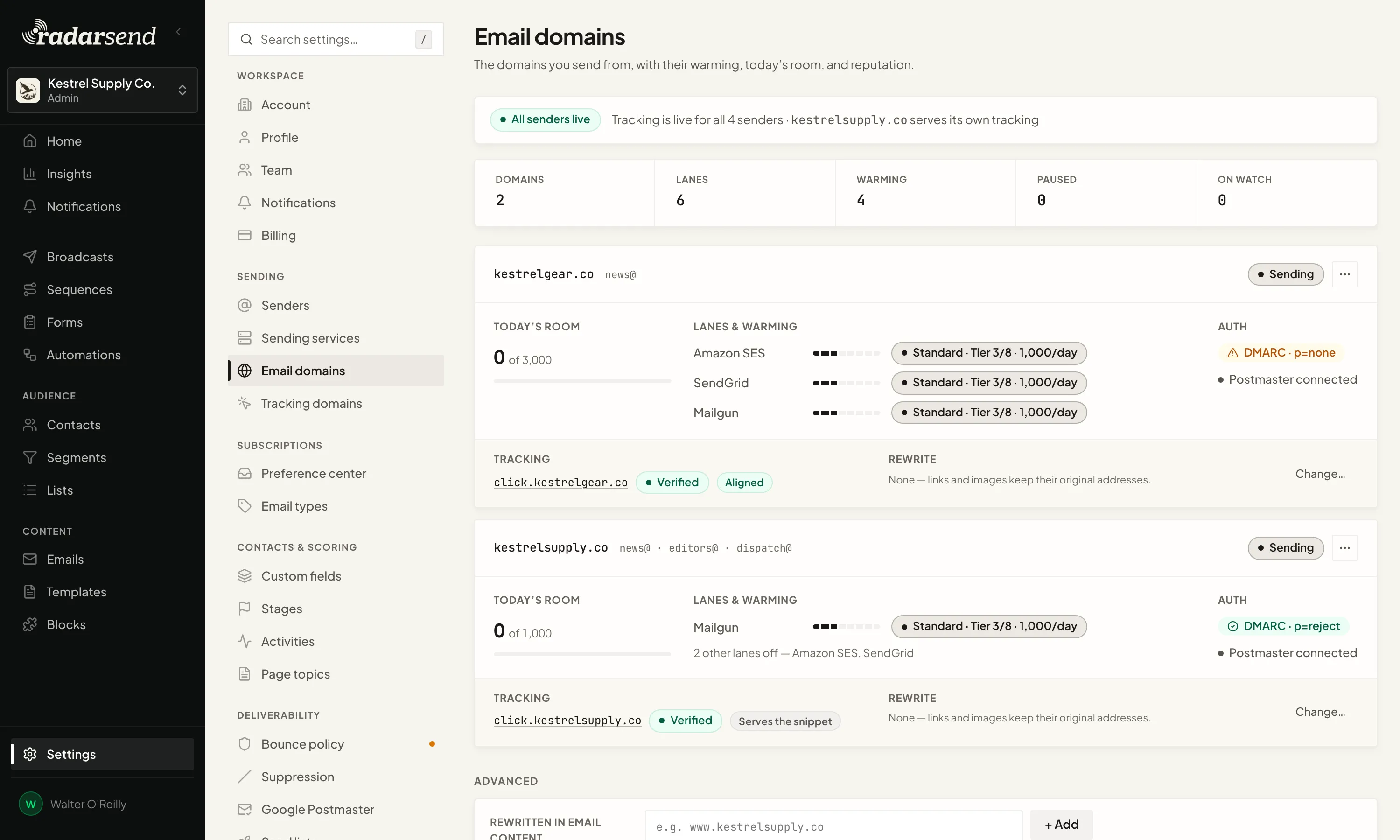
Some teams send marketing from a second domain to protect the reputation of their main one. RadarSend gives each sending domain its own tracking address, so the links, open pixel, and unsubscribe link in an email all match the domain it came from. If you host images on that domain too, RadarSend points your image links there as well.

If your main website runs on Cloudflare, each click also passes through it for a moment, where RadarSend sets its cookie, and then goes on to the page you linked to. That way, visits from every sending domain are tied to the same person on your site.

Email domains settings: two sending domains, kestrelgear.co and kestrelsupply.co, each with its own verified tracking address.
Each sending domain gets its own tracking address.

Know who you’re sending to

See which email service each contact is on

For Gmail or Yahoo addresses, the provider is right there in the address. Business addresses don’t tell you, and a company domain could be on Microsoft 365, Google Workspace, or behind a security filter like Proofpoint or Mimecast.

RadarSend looks up the mail server for each contact’s domain and labels it with one of more than 30 email services and security filters. You’ll see the label on every contact, you can build segments on it, and each broadcast shows delivery, opens, and clicks by provider.

It also feeds bot filtering: a click from a Mimecast scanner counts as a bot only for contacts who are actually behind Mimecast. When a company runs a security filter in front of its mailboxes, RadarSend shows the filter, since that’s what your email meets first.

How bot filtering works →

Deliverability tools

Paste in test addresses and send a deliverability test

Inbox-placement services like GlockApps and Mail-Tester give you a set of addresses to send to, then show where your email landed. On a lot of platforms, the only way to reach those addresses is to add them as contacts, which puts test opens and clicks into your reports.

In RadarSend, you paste up to 150 addresses into the broadcast and send. The test goes out with the same sender, content, and tracked links as the real send. You can choose which variant and sender to test and add the service’s seed code. None of it shows up in your reports, contact list, or warming numbers.