The automation and scoring you use in Mautic, without the server.
Mautic gives you automation and lead scoring, and a server to run. RadarSend gives you the same depth, hosted, with security scanner clicks and automatic opens taken out of the numbers.
Mautic has the depth.
Campaigns, lead scoring, and contact timelines, all on a server you have to run and keep up.
A server to keep running: PHP, MySQL, cron jobs, and SSL
Security scanner clicks and Apple Mail opens still count
Warming up a new domain is done by hand
A branded preference center you build by hand
A server to run.
The same depth, hosted, with the bots taken out.
Nothing to install, update, or keep awake, domain warming that runs on its own, and every open and click checked, so a scanner's click never adds to a lead score or sends someone down the wrong path.
What changes when the server goes away.
The server goes away.
Mautic needs PHP, MySQL, a web server, SSL, cron jobs, queue workers, and enough memory to process campaigns without timing out. Someone has to handle updates, backups, security patches, and the occasional “why did my campaign get stuck” investigation. RadarSend is hosted, so there’s nothing to install, update, or restart.
Scanner clicks stop counting.
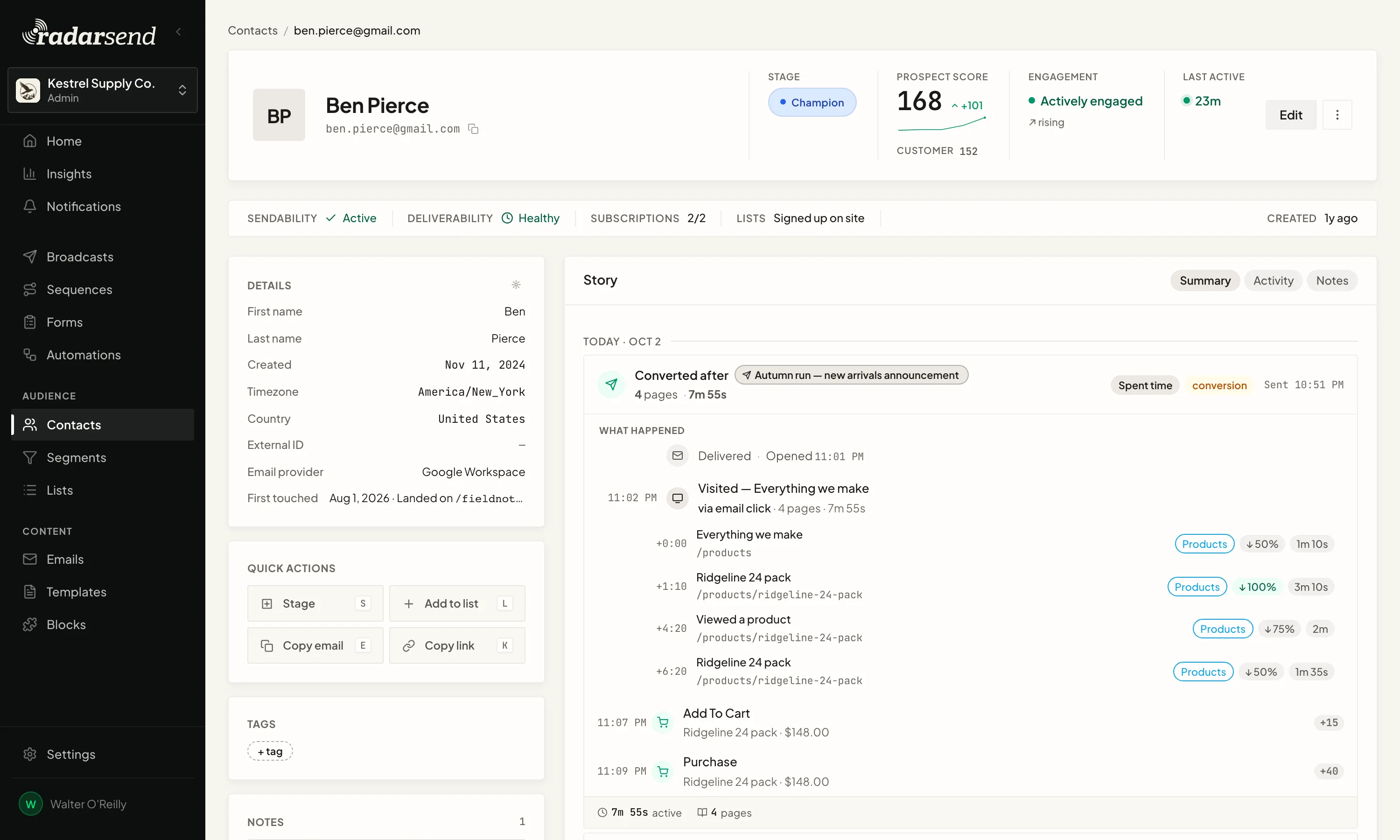
Mautic filters out opens and clicks from known bot user agents. But the security tools many companies run click every link before a person sees it, and Apple Mail opens every email on its own, and both look like an ordinary browser. Those still count as opens and clicks, add points to lead scores, and can send people down the wrong campaign path. RadarSend checks every open and click, and sequences only branch on what a person did. How bot filtering works →
Warming and the preference center are ready.
A new sending domain has to start small and build up. In Mautic that means a spreadsheet and splitting your list by hand. In RadarSend you click Start warming, and it raises the daily limit as the domain earns it. Mautic’s preference center is off by default, and a branded one is a landing page you build by hand; RadarSend’s is ready from the start, on your domain.
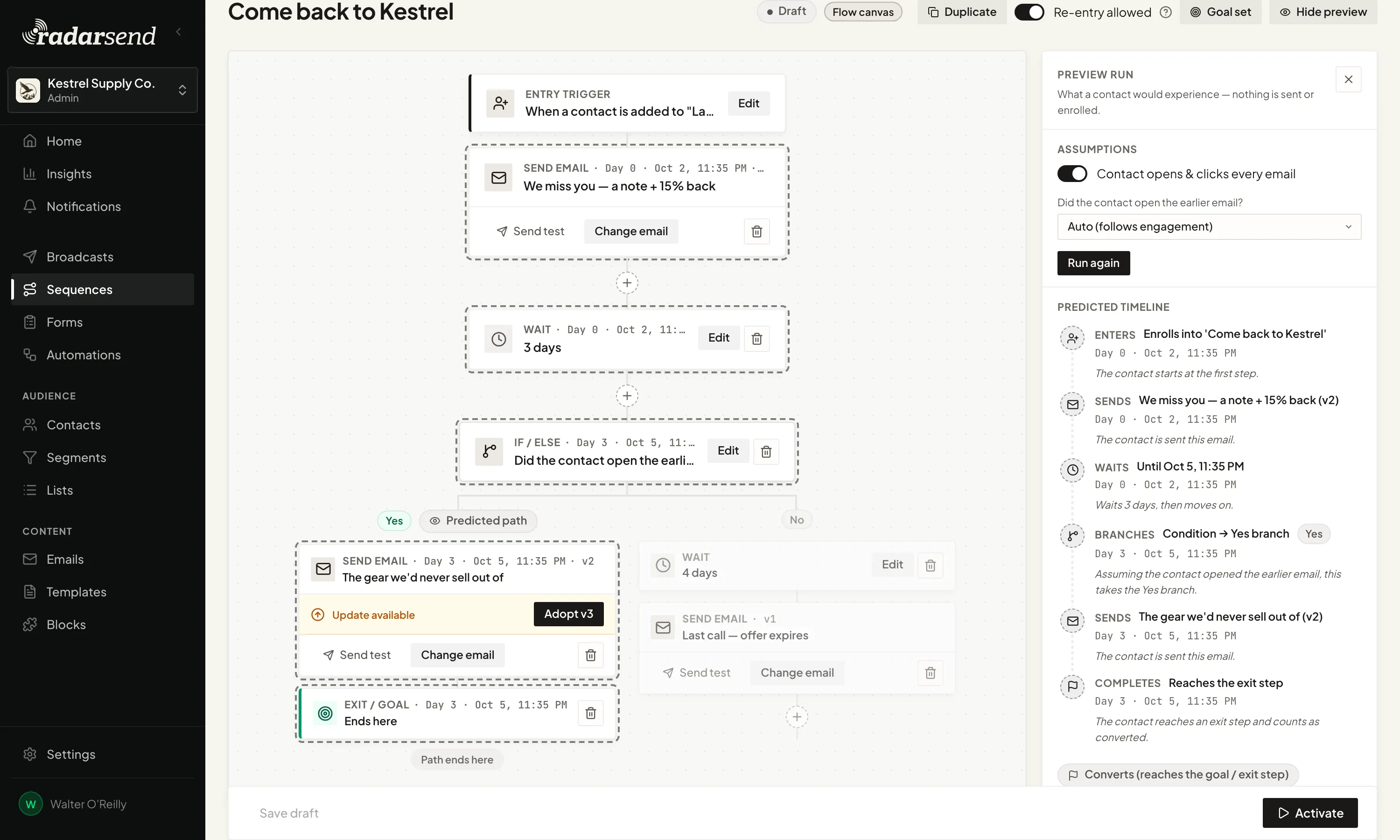
Test a sequence before anyone’s in it.
Mautic has no way to show you the path a contact would take through a campaign. Its own advice is to run a copy on a segment of internal test contacts, with the delays shortened, and then clone it for real.
In RadarSend you run a preview instead. Pick what an example contact does, and it shows the route they’d take and when each email would go out, without sending anything or enrolling anyone.
Once it’s live, you can still change it. Add a step, and you can send it to people who already finished, which a Mautic campaign can’t do.
Mautic’s software is free, but the server and the upkeep aren’t.
Your sending costs don’t change, and the server bill goes away. For a list of 10,000 to 25,000 contacts, RadarSend is $49–$89 a month, billed annually, which is about what a server that can run Mautic costs, and there are no hours of upkeep on top.
Switching doesn't touch your sending.
Your sending service.
RadarSend connects to the sending service you use with Mautic, like Amazon SES, SendGrid, or Mailgun. Mail goes out on your account, at your rate, and the reputation it builds stays with your domains.
The way you work.
Mautic campaigns become RadarSend sequences, and they still branch on what people do. Segments built on activity, contact timelines, lead scoring, and website tracking are all here too, so what you know carries over.
What you send.
We don’t review your campaigns before they go out, so a send goes when you schedule it.
Keep your automation, without the server to run.
We’ll work with you to move your contacts, custom fields, lists, and suppressions, and rebuild your campaigns as sequences. Your sending service stays where it is.
Your Mautic server can keep running while you move, so there’s no set date to switch. Shut it down when you’re ready, and if you have questions about your setup, we’re always happy to walk through it with you.